
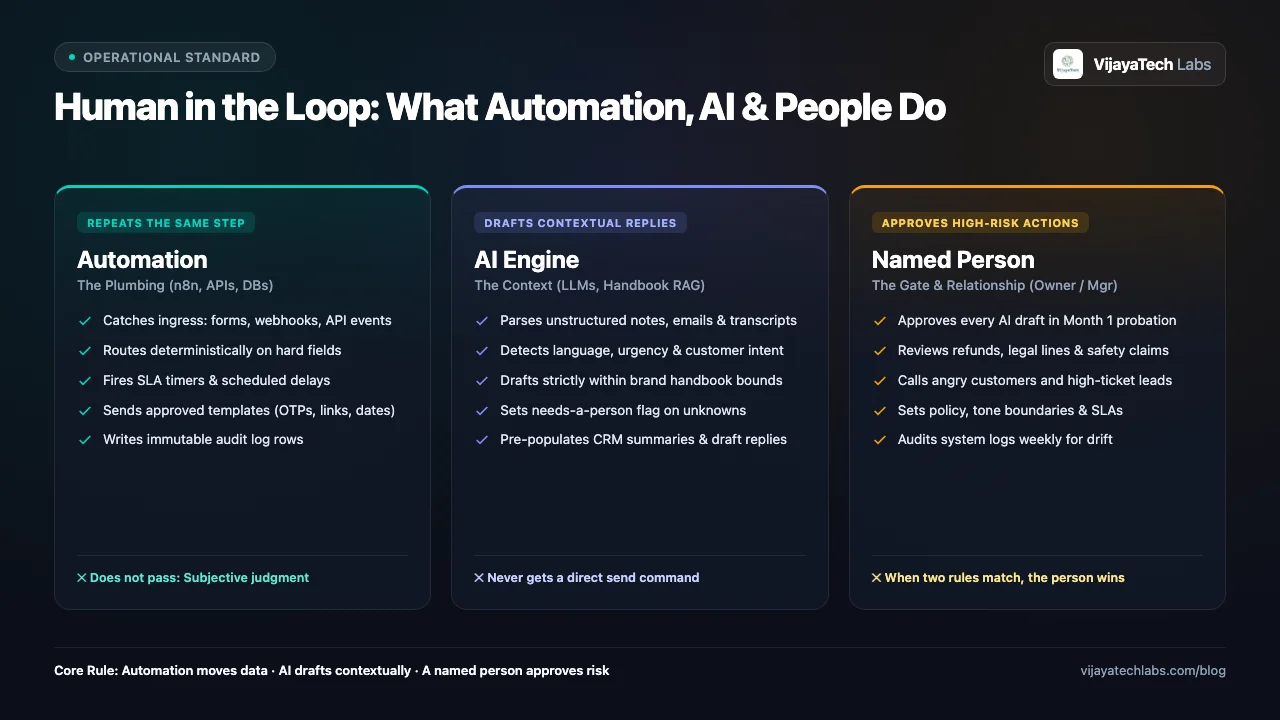
TL;DR — Human in the loop means a named person must approve before the system sends an action that can cost money, trust, or a legal claim. Use automation when the step is the same every time. Use AI when the input is unstructured and the output is a draft. When two of those rules match, the named person wins.
| If this is true | Give the step to | Do not give it to |
|---|---|---|
| The step is the same every time | Automation (n8n, a webhook, a template) | A person who copies rows between tabs |
| The input is unstructured and the output is a draft | AI, bound to the brand handbook and the record | A template that ignores the message, or AI with a send command |
| A wrong action can cost money, trust, or a legal claim | A named person | Automation or unsupervised AI |
Assist, Augment, Replace says how much autonomy a task gets. This post says which system owns each step inside one workflow.
What is human in the loop in business operations?
Human in the loop is an approval gate on risk. It is not a person who does the plumbing.
A service business repeats the same classes of work every week. A lead arrives. An invoice ages. A job needs a technician. A customer writes something public. Each class is a workflow. Each step inside the workflow needs one owner.
The owner is one of three systems:
- Automation moves known fields, fires timers, sends fixed messages, and writes the audit row.
- AI reads messy text and returns a draft. AI does not send.
- A named person approves, edits, calls, or freezes the step when a wrong action can cost money, trust, or a legal claim.
A fixed message stays a template. An appointment time, a payment link, and a one-time code do not need a model. AI writes only when the words must change with the input.
Why do operators blur the three jobs?
The workflow breaks when one system is asked to do all three jobs.
Two patterns show up in service businesses.
- The model can send. The business connects a model to email, WhatsApp, or a public profile and leaves the approval gate off. The early drafts look fine. Then the model offers a discount, states a guarantee, or answers an angry customer in public. The owner turns the whole system off.
- The person is the pipe. The business pays for the tools, then a manager copies the customer text into a chat window, copies the answer out, and pastes it into the CRM. The payroll is doing mechanical work.
The fix is the table at the top. Assign every step before you build the workflow.
What must automation own?
Automation runs a step that is the same every time. It does not judge the customer.
On a stack we build with n8n, a database, and webhooks, automation owns five kinds of work:
- Ingress. Catch the form, the ad lead, the missed call, or the mailbox event. Stamp the source and the time.
- Routing on hard fields. An invoice 14 days overdue takes one path. A lead with a prior job over a set amount takes another. A person does not sort those rows by hand.
- Fixed messages. Send the template when the words do not change. The appointment time, the payment link, and the one-time code are templates.
- The ledger. Write the record, the state change, and the timestamp.
- Egress after approval. Deliver the approved message, update the CRM, and start the next timer.
Automation must not write a custom reply, decide whether a complaint is fair, or guess that a job is off plan.
What must AI draft, and what must it not send?
AI reads unstructured input and returns a draft. AI does not get a send command.
Customers write in fragments. They mix languages. They leave a voice note. A template cannot answer that well. AI can, inside a hard boundary.
- Read. Detect the language. Pull the date, the job, and the ask out of the text. Tag the intent.
- Draft from sources. Use that company’s brand handbook, price book, and the open record. Forbidden phrases, the sign-off, and the refund rule live in the handbook. The draft may not add a price, a date, or a promise that is absent from those sources.
- Flag the gap. If the fact is missing, the draft says it does not know and sets a needs-a-person flag.
- Summarize a batch. On a schedule the owner picks, return bullets for the vectors that owner named. A clinic might use wait time, staff manner, and billing clarity. A trades company might use punctuality, quote accuracy, and finish.
AI must not send the draft. It must not promise a refund, name a part from a photo as an order, or argue with a customer. The draft is the memo. The named person is the one who releases it.
When must a named person approve?
The named person is the exception and the relationship.
Use one rule set.
In month one, the named person approves every external message that AI drafted. That month is how the owner finds tone drift and holes in the handbook. The person edits the draft. The person does not retype the plumbing.
A step may leave that gate only when all three are true:
- The output is reversible.
- The cost of a wrong send is low.
- A person still spot-checks a sample.
These steps can leave the gate after month one, and only in writing: a fixed template, an internal summary nobody outside the company sees, a CRM field fill a person can undo. A public thank-you with no complaint can leave the gate only under the review rules linked below.
These steps never leave the gate:
- A refund, a discount, or any price that is not in the price book.
- Legal wording, a safety claim, or a threat.
- A pause in service, or a handoff to collections.
- A parts list or a dispatch cost taken from a photo or a vague fault note.
When a customer is angry, or the inquiry is high-ticket, the right next step is often a phone call. Automation sends the named person a card with the record and the draft. The written message waits.
The owner still sets the policy. The machines execute it. The owner decides what acceptable service is, who receives the alert, and which vectors the weekly note must grade.
What does each system pass to the next?
Each system passes a fixed packet. AI never passes a send command.
| From | Passes | Does not pass |
|---|---|---|
| Automation | Record id, source, time, hard fields, raw text, and the risk flags it can know | A judgment |
| AI | Draft, language, intent, the needs-a-person flag, and the policy line it used | A send command |
| A named person | Approve, edit, call, or freeze | The plumbing |
| Automation, after approval | The send, the audit row, and the next timer | A send with no approval |
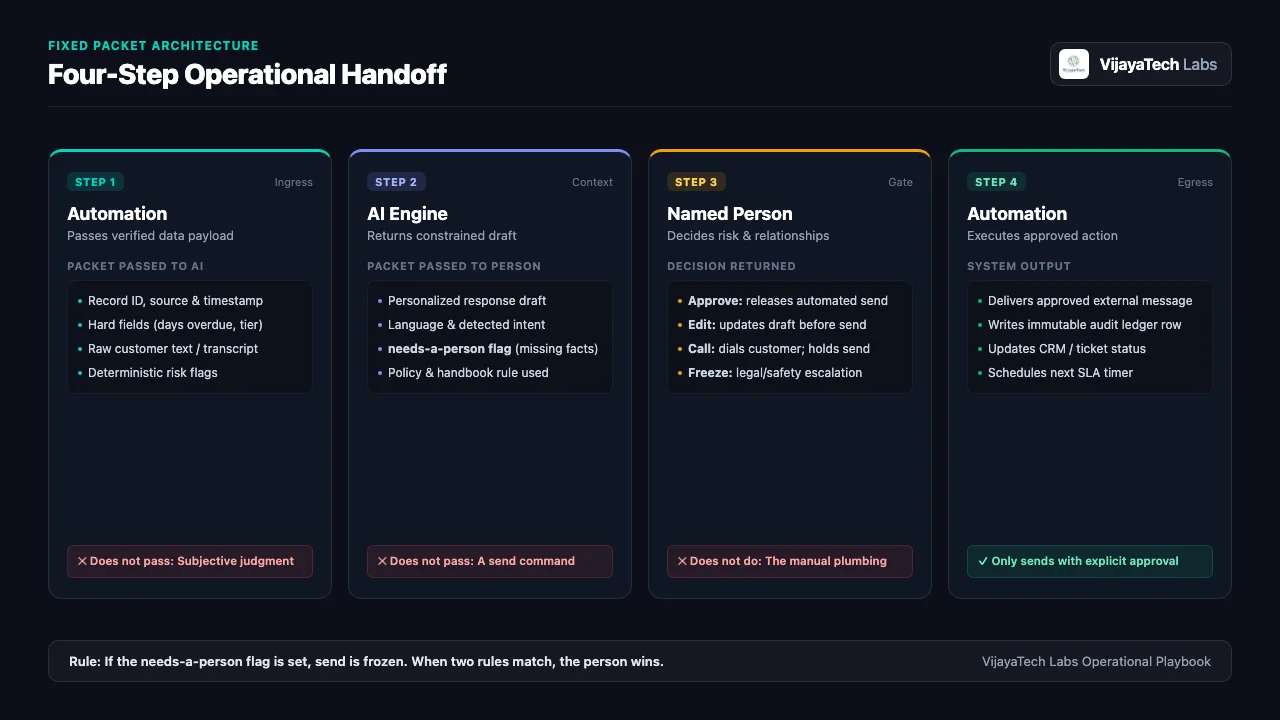
If the needs-a-person flag is set, automation freezes the send and alerts the named person. A keyword list such as lawsuit, injury, or fraud is an extra freeze. It misses paraphrases. The flag and the month-one gate are the controls.
How does the split run on four workflows?
The same three owners apply to lead intake, payment reminders, field support, and public replies. Reviews are the last example, not the model.
Lead intake
Automation captures the lead, AI drafts only when the note needs new words, and a named person calls when the job is high-ticket or the note is angry.
- Automation takes the form or the ad lead, checks the phone format, opens the CRM record, and matches it to past jobs.
- AI reads the free-text note and drafts a follow-up from the brand handbook. A bare “please call me” can stay on a template.
- A named person gets the card on the phone they already watch, approves or edits the draft, and calls when the job is high-ticket or the note is angry.
The alert target in the 60-second lead guide is 60 seconds. The build pattern for this lane is the lead-to-revenue system.
Stop rule: a high-ticket inquiry or an angry note does not auto-send.
Payment reminders
Automation watches the due date, AI drafts when the tone must change, and a named person approves any pause in service.
- Automation reads the ledger and starts the reminder path on the days the owner set. It records the payment link and the payment webhook.
- AI drafts the note for that day. Day 7 and day 21 do not use the same tone. The draft may not add a threat or a fee that is absent from the handbook.
- A named person approves a service pause or a collections handoff, and calls when a reply disputes the invoice.
Zira can run the routine chase. A dispute, a refund, and a service pause stay with the named person.
Stop rule: the draft must not threaten legal action. A dispute freezes the send.
Field support
Automation logs the ticket and the timer, AI drafts the briefing, and a named person approves parts and cost before dispatch.
- Automation opens the ticket, stamps the customer tier, checks the schedule fields, and starts the SLA timer.
- AI reads the fault note and drafts a briefing. A photo can sit on the card as evidence. It is not an order.
- A named person approves the technician, the parts, and any cost that is outside the standard job. That person also signs a warranty exception.
Stop rule: nobody dispatches parts from a model reading of a photo.
Customer reviews
A public review is one example of the same split.
- Automation fetches the review, stores the stars as a field, and publishes only an approved reply.
- AI detects the language and drafts from the brand handbook. The draft names a detail from the review. “Thanks for visiting” shows that nobody read it.
- A named person approves during month one. After that, only a narrow low-risk case can leave the gate, and only in writing. A 1-star or 2-star review stays on hold until the person calls the customer. Legal or safety wording goes to the owner and does not auto-publish.
The star rules live in the negative review defense guide.
Stop rule: call before a public reply on a 1-star or 2-star review.
What must the owner decide before the build?
The system drafts into a void until the owner writes five decisions down.
- The brand handbook. Tone, sign-off, the price book, the refund rule, and the phrases the company will not use.
- The named person and the backup. Who approves, who covers leave, and which channel they already watch.
- The probation list. Which steps may leave the gate after month one. Write it down. A vague “low risk” is not a rule.
- The freeze rules. The needs-a-person flag is mandatory. A keyword list is optional and extra.
- The report vectors. The owner names what the weekly note must grade. The model does not invent the scorecard.
What this split refuses to do
The boundary is the product.
- It refuses an unmonitored send on a high-consequence action. The system does not refund money, bind the company, or argue in public on its own.
- It refuses invented activity. It does not fabricate reviews, fake engagement, or a follow-up that pretends a person typed it on impulse.
- It refuses to replace the person when trust is damaged. A missed visit, a bad job, or an angry customer becomes an alert so the named person can answer.
- It refuses a false privacy claim. Customer text is private. n8n can run on the client’s server. That does not keep the text private if the draft call goes to a model that trains on inputs. Use a zero-retention model path.
Frequently asked questions
Which workflow should a service business automate first?
Start with lead intake. The fields are known, the volume is high, and a wrong draft is easy to stop before it sends. Use a template when the words do not change. Use AI when the note needs a real reply. Keep the named person on high-ticket and angry inquiries. The 60-second lead guide is the companion.
How do you stop AI from promising the wrong price or refund?
Give the model only the brand handbook, the price book, and the open record. Instruct it to decline any commitment that is not in those sources. If a fact is missing, the draft says it does not know and sets the needs-a-person flag. A named person approves before the send. This does not remove hallucination. It keeps a wrong promise off the customer.
What happens when the approver is away?
Name the backup before go-live. If the first person misses the time limit you set, automation routes the gate to the backup. An empty gate must not send.
Can this run on self-hosted tools?
Yes. We run the workflow on n8n, including a self-hosted n8n when the client requires it, with Supabase or Postgres for the ledger. Self-hosting the workflow does not by itself make customer text private. The model path must be zero-retention, so the provider does not train on that text.
How is this different from Assist, Augment, Replace?
Assist, Augment, Replace sets how much autonomy a task gets, from a copilot to a full handoff. This split assigns automation, AI, or a named person to each step. A workflow can sit at “augment” overall and still use all three owners inside it.
Related reading
- The Assist-Augment-Replace framework
- Lead response time: why 60 seconds beats 60 minutes
- The SMB lead-to-revenue automation playbook
- Zira: the agent that chases routine invoices
- Negative Google review defense: what to automate and what to approve
Get started
Tell us one workflow that still depends on a person to copy data or to watch an unsupervised send.